
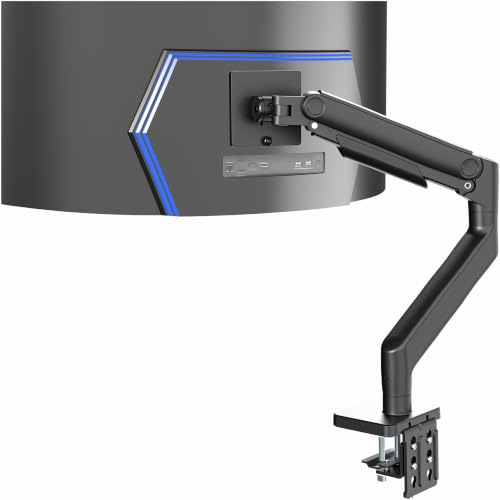
If you are wrestling with a massive ultrawide monitor that refuses to stay put, you know the struggle. The factory stand eats up desk space, wobbles with every keystroke, and leaves your neck aching by midday. A heavy duty monitor arm solves all that, but choosing the right one for a 49-inch or 57-inch screen can feel overwhelming. This ULTRARM heavy duty monitor arm review breaks down the top contenders, including the ULTRARM Heavy Duty Monitor Arm for Ultrawide, to help you find a rock-solid, ergonomic setup that transforms your workspace. Whether you are a gamer, a programmer, or a creative professional, we have the details you need.





Buying Guide
Weight Capacity and Monitor Size
The first thing to check is whether the arm can handle your monitor’s weight and size. For ultrawide screens, look for a capacity of at least 33 to 44 pounds. Models like the ULTRARM Heavy Duty Monitor Arm for Ultrawide support monitors up to 57 inches, while the HUANUO TitanLift Heavy Duty Monitor Arm holds up to 49 inches. Always verify your monitor’s VESA pattern (75x75mm or 100x100mm) and weight before buying.
A heavy duty arm with a high load rating ensures your screen stays stable without sagging. If you own a Samsung Odyssey G9 or similar curved display, prioritize arms that specifically mention compatibility with 1000R curvature. For more on this, check our guide to the best monitor arm for curved monitor.
Build Quality and Materials
Construction materials directly affect durability and stability. Aluminum alloy arms, like those used in the VIVO Heavy Duty Aluminum Ultrawide Monitor Tension Arm and the HUANUO TitanLift, offer a strong yet lightweight frame. Thicker steel arms and reinforced VESA heads reduce wobble, especially during typing or gaming sessions.
Look for arms that have passed rigorous motion and load certifications. The ErGear Heavy Duty Monitor Arm, for instance, is built to last up to a decade with a 37.4-pound capacity. A solid build prevents screen droop over time, keeping your monitor exactly where you set it.
Adjustability and Ergonomics
Full motion range is key for ergonomic comfort. You want tilt, swivel, rotation, and height adjustment to position the screen at eye level. Pneumatic spring systems, like those in the ULTRARM arm, allow smooth height changes with gas lift. The HUANUO FlowLift Pro uses a MechaSpring design for consistent support without gas pressure loss.
Arms with tool-free VESA plates, such as the HUANUO FlowLift Pro, make installation a breeze. For heavy monitors, a detachable VESA plate simplifies mounting. If you need a setup for multiple screens, consider the modular extension arms on the ULTRARM model, which can upgrade to a dual or triple mount. Our best dual monitor arm guide has more insights.
Mounting Options and Desk Compatibility
Most heavy duty arms include both C-clamp and grommet mounts. Check your desk thickness and material before purchasing. Wooden desks are recommended, while glass or plastic surfaces may not provide enough support. The WALI Ultrawide Single Monitor Arm fits desks up to 1.96 inches thick, while the HUANUO TitanLift supports up to 3.5 inches.
Ensure your desk has no cross beams blocking the underside. For a complete workspace upgrade, pair your monitor arm with a quality keyboard tray from our best buy keyboard tray. A clutter-free desk boosts productivity and reduces strain.
Final Thoughts
After evaluating these six heavy duty monitor arms, our top recommendation for most users is the ULTRARM Heavy Duty Monitor Arm for Ultrawide for its exceptional 44-pound capacity, modular extension arms, and smooth pneumatic height adjustment that works perfectly with screens up to 57 inches. For a budget-friendly option that does not compromise on stability, the ErGear Heavy Duty Monitor Arm for 13-49″ Ultrawide offers a 37.4-pound capacity and a dual C-clamp for rock-solid support at a lower price point. Whichever you choose, your neck and back will thank you.
Frequently Asked Questions
Will a heavy duty monitor arm fit my ultrawide monitor?
Check your monitor’s VESA pattern (75x75mm or 100x100mm), weight, and screen size. Most heavy duty arms support up to 44 pounds and 49 inches. For monitors up to 57 inches, the ULTRARM Heavy Duty Monitor Arm for Ultrawide is a great fit. Always verify specifications before purchasing.
How do I install a heavy duty monitor arm?
Installation typically takes 10 to 30 minutes. Attach the clamp or grommet base to your desk, mount the VESA plate to your monitor, and then snap the monitor onto the arm. Most arms include clear instructions and labeled parts. The HUANUO FlowLift Pro offers a tool-free InstaMount for quick setup.
Can I use a heavy duty monitor arm with a curved monitor?
Yes, most heavy duty arms support curved monitors with a 1000R radius or less. Ensure the arm’s weight capacity matches your monitor’s weight. The HUANUO TitanLift and ErGear arms are excellent choices for curved ultrawide screens. For more details, read our best monitor arm for curved monitor.
How much weight can a heavy duty monitor arm hold?
Heavy duty monitor arms typically hold between 33 and 44 pounds. The ULTRARM and HUANUO TitanLift support up to 44 pounds, while the ErGear holds 37.4 pounds. Always check the arm’s maximum load to ensure it can handle your monitor safely.