
If you’re wrestling with a massive ultrawide monitor that keeps sagging or wobbling on its stock stand, you know the struggle. A heavy duty monitor arm is the solution, and the WALI lineup has some serious contenders. In this WALI heavy duty monitor arm review, we’ll break down the best models for large and curved screens, focusing on stability, ergonomics, and ease of installation.
Whether you’re a gamer, a programmer, or a data analyst, the right arm can transform your workspace. We’ve evaluated seven top arms from WALI, HUANUO, ErGear, and VIVO to help you find the perfect match. Let’s dive into the details.




Buying Guide: What to Look for in a Heavy Duty Monitor Arm
Weight Capacity and VESA Compatibility
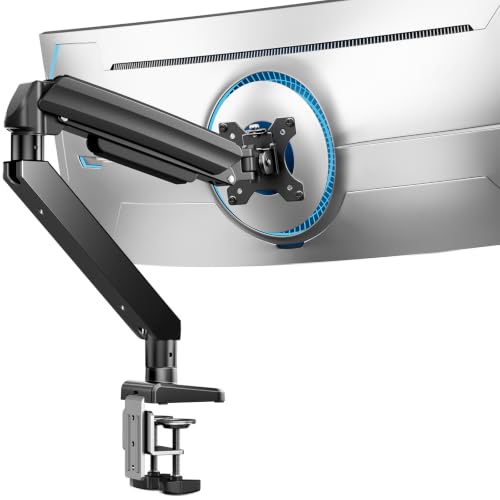
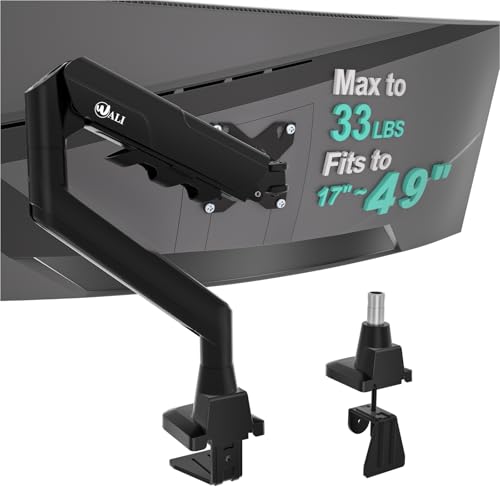
First, check your monitor’s weight and VESA pattern (75x75mm or 100x100mm). Heavy duty arms like the WALI Heavy Duty Monitor Arm for 13-49 inch 1000R support up to 44 lbs, perfect for massive curved displays. For lighter ultrawides, the ErGear Heavy Duty Monitor Arm handles 37.4 lbs, while the WALI Ultrawide Single Monitor Arm holds 33 lbs.
Always verify your monitor’s specs before purchasing. A mismatch can lead to sagging or even damage. If you’re unsure, check our guide on the best monitor arm for 34 inch ultrawide for more insights.
Range of Motion and Ergonomics
Look for arms that offer full motion: tilt, swivel, rotation, and height adjustment. The WALI Adjustable Single Monitor Arm for 13-34 inch provides +70°/-45° tilt and 360° rotation, letting you position your screen perfectly. The VIVO Premium Aluminum Heavy Duty Dual Monitor Arm adds pneumatic height adjustment for effortless changes.
Ergonomic positioning reduces neck and eye strain, especially during long work sessions. A monitor arm that keeps your screen at eye level is a game-changer. For more on ergonomic setups, see our best monitor arm for 32 inch monitor article.
Desk Mounting Options and Stability
Most arms offer C-clamp or grommet mounting. Ensure your desk can support the clamp and that there’s no crossbeam blocking the underside. The ErGear Heavy Duty Monitor Arm uses a dual C-clamp for extra stability, ideal for heavy screens. The WALI models include both mounting options, with clear instructions.
Stability is crucial: a wobbly arm defeats the purpose. Look for arms with reinforced steel and wide VESA heads, like the WALI Adjustable Single Monitor Arm. If you’re exploring different brands, check our best monitor arm brand guide.
Cable Management and Build Quality
Integrated cable management keeps your desk tidy and prevents cord tangling. All the arms in this review feature built-in channels or covers. Build quality matters: look for arms that have undergone thousands of motion cycles, like the WALI and HUANUO models, which are rated for 20,000+ cycles.
A well-built arm lasts for years. The VIVO Premium Aluminum Dual Monitor Arm uses premium aluminum for a sleek, durable design. For budget-friendly options, see our best cheap monitor arm picks.
Final Thoughts
In the end, the right heavy duty monitor arm depends on your monitor’s size and your desk setup. For most users, the WALI Adjustable Single Monitor Arm for 13-34 inch offers an unbeatable balance of stability and affordability, while the ErGear Heavy Duty Monitor Arm for 13-49″ Ultrawide is a rock-solid choice for massive ultrawide screens. Whichever you pick, you’ll enjoy a cleaner desk and better posture.
Frequently Asked Questions
Can a heavy duty monitor arm hold my 49-inch ultrawide monitor?
Yes, but you need an arm with a high weight capacity and VESA compatibility. The WALI Heavy Duty Monitor Arm for 13-49 inch 1000R supports up to 44 lbs, making it suitable for most 49-inch curved monitors. Always verify your monitor’s weight and VESA pattern first.
What is the difference between C-clamp and grommet mounting?
C-clamp attaches to the edge of your desk, while grommet mount goes through a hole in the desk. Both are secure, but grommet is better if you have a lip on your desk edge. Most arms include both options, so choose based on your desk’s design.
How do I know if my monitor is VESA compatible?
Check the back of your monitor for four screw holes in a square pattern (75x75mm or 100x100mm). If you see them, it’s VESA compatible. If not, you may need an adapter plate. The arms in this review all support standard VESA patterns.
Are monitor arms worth it for ergonomics?
Absolutely. A monitor arm lets you position your screen at eye level, reducing neck and back strain. It also frees up desk space and improves cable management. For 2026, investing in a quality arm is one of the best ergonomic upgrades you can make.