

Are you tired of a cramped desk where your keyboard and mouse fight for space with papers, coffee mugs, and everything else? An under-desk keyboard tray is the simple solution that transforms your workstation. By moving your keyboard below the desk surface, you instantly free up valuable real estate and can adopt a more natural, ergonomic typing posture. This guide reviews the best buy keyboard tray options available now, focusing on durable, easy-to-install models that fit a range of desk styles and budgets.
We have evaluated nine top-rated trays from trusted brands like VIVO, XINLEI, and AX WABER. Whether you need a compact slide-out platform for a small desk or an extra-long tray for a full-size keyboard and mouse, we have you covered. For more on creating a complete ergonomic setup, check out our guide on the best under desk keyboard tray.


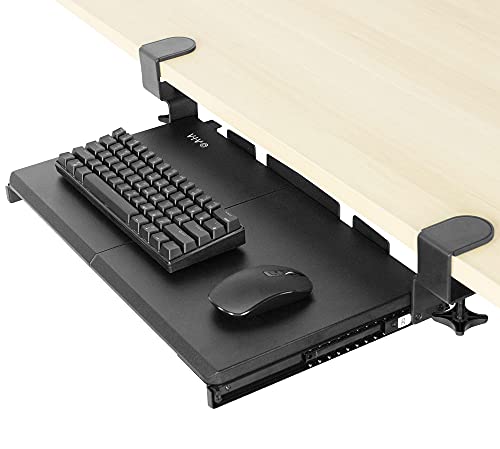


Buying Guide
Desk Compatibility and Clamp Style
Before you buy, measure your desk’s thickness and edge type. Most clamp-on trays fit desks up to 1.25 to 2 inches thick, but some models like the VIVO Black Clamp-on 23” to 30” x 11″ Adjustable can handle up to 3.4 inches. Crucially, check if your desk has a beveled or lipped edge, as many trays explicitly state they are not compatible with these. If you have a standing desk with a crossbar, look for a model that includes a spacer bracket or choose a tray with a single rotating clamp that avoids the frame.
Tray Size and Slide-Out Length
Consider both the tray surface area and how far it extends from the desk. A standard full-size keyboard and mouse need at least 20 x 11 inches, while an extra-long tray like the VIVO Black Extra Large Clamp-on 34 x 11 offers 33.9 inches of space for a keyboard, mouse, and accessories. The slide-out length (how far the tray pulls toward you) ranges from about 5.7 to 9.8 inches. A longer slide-out gives you more flexibility for finding the perfect typing angle, but also requires more legroom under your desk.
Ergonomic Adjustability
The best keyboard trays offer more than just a flat surface. Look for models that provide height adjustment, tilt, or even 360-degree rotation. For example, the LLDEPLL Keyboard Tray Under Desk with Storage rotates 180 degrees horizontally and tilts 30 degrees vertically, allowing you to fine-tune the position for your arms and wrists. Even simple slide-out trays improve ergonomics by letting you keep your elbows at a 90-degree angle and your wrists straight. For more on ergonomic accessories, see our Desk Accessories category.
Build Quality and Weight Capacity
A sturdy tray should hold at least 11 pounds without wobbling. All the models we reviewed meet this standard, but the clamp design matters. Trays with two C-clamps (like the VIVO Black Clamp-on 27 x 11 in Keyboard Tray) distribute weight more evenly and are less likely to shift than single-clamp designs. Metal construction with a powder-coated finish resists wear and looks professional. If you plan to use a heavy mechanical keyboard, opt for a tray with a solid steel frame and reinforced clamps.
Final Thoughts
After reviewing nine of the best buy keyboard tray models, we recommend the VIVO Black Extra Large Clamp-on 34 x 11 for those who need generous space for a full-size keyboard and mouse, and the AX WABER Keyboard Tray Under Desk Pull Out as an excellent budget-friendly option that does not compromise on stability. Both are easy to install and will transform your desk into a cleaner, more ergonomic workspace.
Frequently Asked Questions
Will a keyboard tray fit my desk?
Most clamp-on trays fit desks with a flat edge and a thickness up to 2 inches. Measure your desk’s thickness and check the product specifications for maximum thickness. Also ensure there is enough clearance under the desk for the tray and your legs. For desks with crossbars, you may need a spacer or a single-clamp tray that can be positioned to avoid the frame.
How do I install a keyboard tray?
Installation is straightforward and usually takes 10 to 20 minutes. Most trays come with all necessary hardware and an instruction manual. You simply attach the C-clamps to the edge of your desk, slide the tray onto the rails, and tighten the clamps. No drilling is required for clamp-on models. If you have a thick or unusual desk, some models also offer a screw-mounting option for added security.
Can I use a keyboard tray with a standing desk?
Yes, but you need to check for compatibility. Some standing desks have a crossbar that can interfere with the tray’s clamps or sliding mechanism. Look for a tray that includes a spacer bracket (like the VIVO Black Under Desk 25 x 10 in Keyboard Tray) or choose a model with a single rotating clamp that can be positioned to avoid the crossbar. Also ensure the tray does not hit your legs when the desk is at its lowest height.
What is the difference between a slide-out and a rotating keyboard tray?
A slide-out tray pulls forward on rails, extending toward you for typing and sliding back under the desk when not in use. A rotating tray pivots on a single clamp, allowing you to swivel it 360 degrees for flexible positioning. Rotating trays are great for shared workspaces or when you need to move the tray out of the way completely. Slide-out trays are generally more stable and better for heavy keyboards. For more comparisons, see our best keyboard trays adjustable under desk guide.


