
You have carved out a corner of your home for productivity, but the standard rectangular desk feels cramped and leaves you reaching for your coffee mug while your monitor wobbles. An L shaped standing desk transforms that awkward corner into a powerful, ergonomic command center. This guide reviews the top L shaped standing desks for a home office in 2026, comparing models from OffiGo, Casaottima, and SEDETA to help you choose the ideal setup for your workflow and space.
For more on optimizing your workspace, see our roundup of the top L shaped standing desks for Spacious, flexible workstations in 2026.


Buying Guide
Height Adjustment Range and Presets
Your comfort depends on the desk’s ability to match your seated and standing heights. Look for a range that accommodates your stature, typically between 28 and 47 inches. Electric models with programmable memory presets let you switch positions instantly without fiddling with controls, which encourages you to alternate postures throughout the day.
If you are taller than average, check out our guide to the best standing desk for tall people for more specific recommendations.
Storage and Organization Features
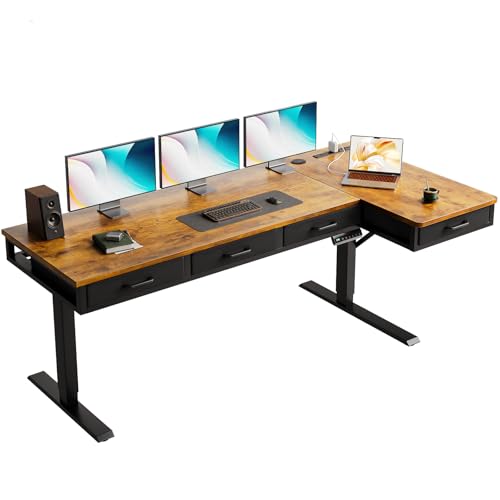
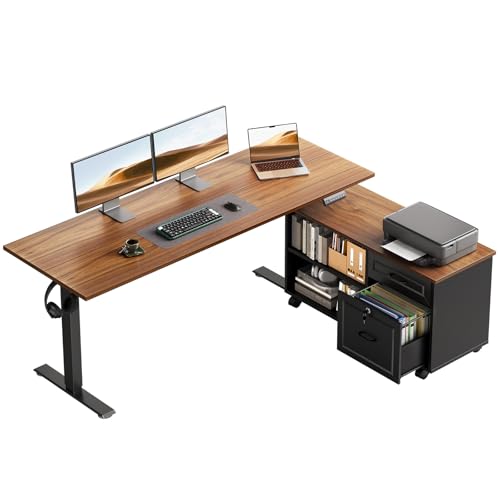
A cluttered desk kills focus. The best L shaped standing desks integrate drawers, shelves, or cabinets to keep supplies, files, and devices within reach but out of sight. Consider whether you need a file drawer for documents, a cabinet for a printer, or small bins for pens and notebooks. Built-in power outlets and USB ports are a huge plus for charging phones and tablets without cable clutter.
For more storage ideas, see our selection of the best standing desk with drawers.
Stability and Build Quality
A wobbly desk is distracting and can damage your equipment. Look for a frame made from industrial-grade steel with a dual-beam design. The desk should remain stable even at maximum height, especially if you use multiple monitors. A weight capacity of at least 150 pounds gives you room for monitors, a laptop, and accessories without worry.
Reversible Layout and Desk Size
Your room layout determines whether the return (the shorter side) should go on the left or right. Many L shaped desks offer a reversible design, letting you install the extension on either side. Measure your corner carefully and consider the total footprint. A 63-inch main surface provides generous room for dual monitors, while a 55-inch option fits tighter spaces.
Final Thoughts
Choosing the right L shaped standing desk comes down to your storage needs, available space, and budget. For a feature-rich model with ample drawers and a rustic look, the OffiGo 63 Inch L Shaped Electric Standing Desk delivers exceptional value. If you need a more compact setup with a mobile cabinet for flexibility, the OffiGo 55″ L Shaped Electric Standing Desk offers a smart, space-saving solution. Both desks are built to enhance your productivity and comfort, making them excellent investments for your home office in 2026.
Frequently Asked Questions
What is the ideal height range for an L shaped standing desk?
Most electric L shaped standing desks adjust from around 28 inches to 47 inches, which accommodates users from about 5 feet to 6 feet 4 inches tall. The key is to ensure your elbows form a 90-degree angle when typing at seated height and that your monitor is at eye level when standing.
How much weight can an L shaped standing desk support?
Quality models support between 150 and 200 pounds. This is enough for dual monitors, a laptop, a keyboard, and a few accessories. Always check the weight capacity before loading your desk, especially if you plan to use heavy equipment like a large printer or multiple monitors.
Can I install the L shaped desk on either side of the corner?
Yes, most L shaped standing desks feature a reversible design. You can install the return on the left or right side to fit your room layout. This flexibility makes them suitable for both left-handed and right-handed users and for rooms with doors or windows on one side.
Are L shaped standing desks difficult to assemble?
Assembly is manageable for most people with basic tools. The desks come with clear, step-by-step instructions and labeled parts. Plan for about one to two hours, and having a second person helps with lifting the desktop into place. For more tips on setting up your workspace, read our guide on the best standing desk for home office.